Incorrect Total Episode Count for Specific TV Show
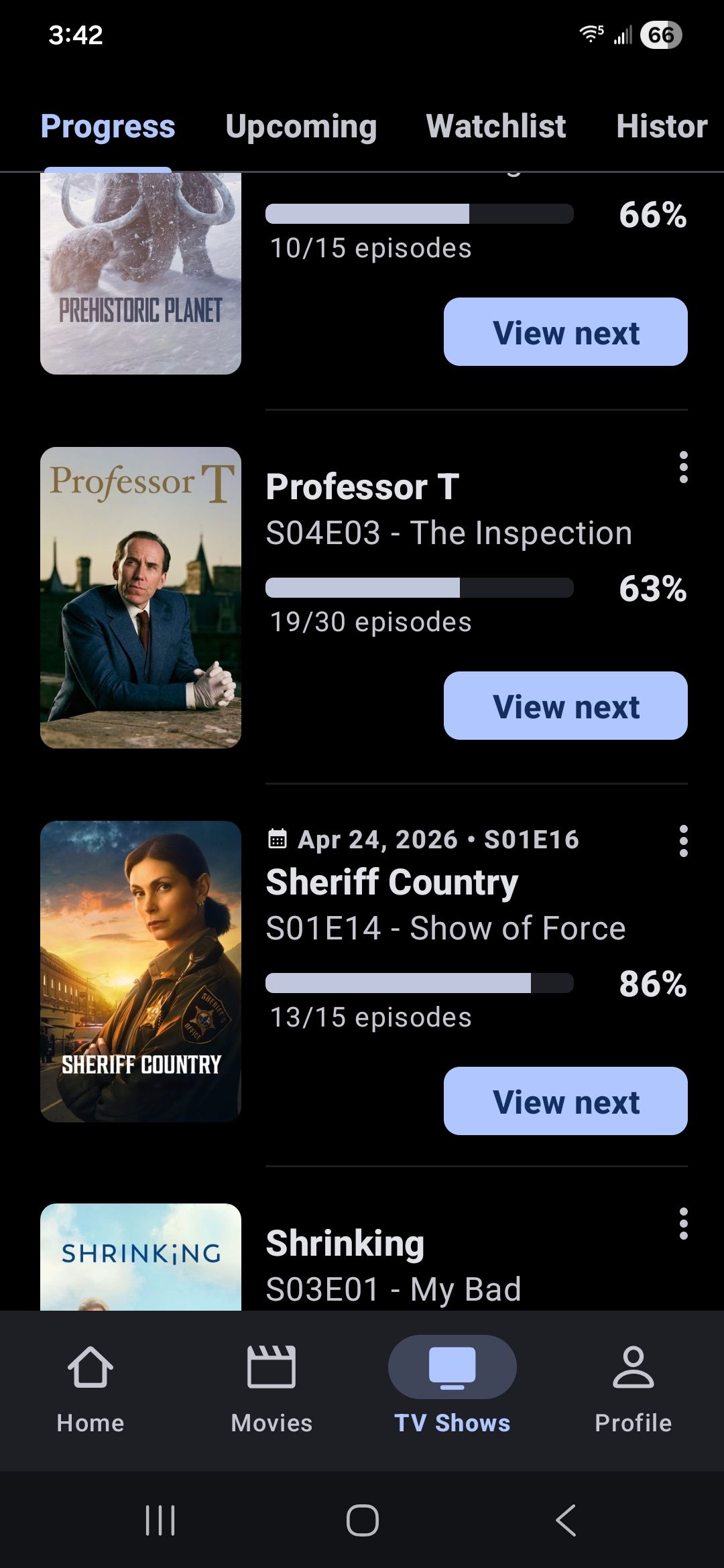
“Professor T” is listed on my Progress Screen and showing a total available episode count of 30. The problem is that the total count of 30 includes the episodes in season 4 and season 5. None of those episodes yet has an air date. So, I don’t think it should appear on the Progress Screen, and the total episode count should probably be 18. The only unusual thing about this show is that I have marked one of the episodes without an air date as watched. That is because I did find it somewhere and watch it. It is fairly common for some episodes to really be available somewhere and not yet have a TMDB air date because they haven’t yet aired on what TMDB considers to be the originating source for the show. I suspect that my marking that episode as watched has triggered the issue. And perhaps it would make sense to have the total episode count include that episode and thus be 19. But that should not trigger its appearance on the Progress screen.
The following screen shots illustrate the issue:


Log in to comment and vote
Comments7
Christian Krueger
Apr 25
Christian Krueger
Apr 25
Interesting, I only have 18 aired episodes in it.
Christian Krueger
Apr 25
Thanks. I will check why the data includes these episodes.
https://www.themoviedb.org/tv/126660-professor-t/season/4
Stephen Jarrell
Apr 25
Chris,
After I sent this report, I tried selecting the show and viewing its details multiple time. Each time I would select it, the total count of shows would change. It would be adjusted downward. After some number of times doing this, the show disappeared from my progress screen, indicating that the total count had been reduced to the point that it no longer thought there were unwatched aired episodes. Very strange behavior. Now it does not show on my Progress screen, but you can see from my screen shot that it did when I made the report. I still expect that having an episode without an aired date marked as watched triggered the initial behavior. I’ll let you know if I see this behavior again. It is not terribly common, but there are frequently episodes available for viewing that TMDB has not yet given an aired date, as you are aware.
Stephen Jarrell
Apr 25
I just checked the show again on the Progress screen with “Include Complete” turned on. It now says 19/19 episodes, which is the correct behavior I would expect. It’s curious that I had to view its details multiple ties to get it to that point.
Christian Krueger
Apr 25
TMDB can also send invalid data or the community added wrong dates.
Stephen Jarrell
Apr 26
After I installed version, 6.5.0, and my secondary devices synced up watched episodes, both the secondary devices exhibited the same behavior for that show. Multiple detailed displays of the show were required to get the count to 19/19. It started out at 19/30, clearly wrong. There may be a small problem in the app with properly handling this situation (episode marked as watched when it doesn’t yet have an aired date). We definitely need to be able to do that, and I haven’t seen this issue before. The one thing that might be unique here is that the episode in question, that I have watched, is not the first one of the episodes without an aired date. It the second one. So I have an episode that I haven’t marked as watched immediately before the one that I have marked as watched. That might be the first time I have ever done that.